
The PaluhostCDN is a powerful content distribution network (or content delivery network) that uses physical, highly optimised servers across the world to cache the content of your websites served from the Paluhost platform. Cached content of the data is stored at multiple CDN nodes so global customers will connect directly to CDN nodes instead of directly to our local network, resulting in content being served faster and your websites loading quicker.
It’s included for no extra charge with our Web Hosting packages. The PaluhostCDN is comparable to paid plans from other CDN providers, like Cloudflare.
What are the benefits of a CDN?
Content is actively cached: Every global CDN node actively caches static files. This offers an enhanced and consistent user experience to visitors everywhere – at the same time, page speed is improved and you’ll deliver better-performing sites to your users.
Latency is reduced: The PaluhostCDN has highly connected CDN nodes globally – this means your users will always reach a node close to them, reducing latency and improving website load times.
Improved SEO: With the PaluhostCDN, you’ll get a Website Acceleration Suite which gives you the tools to help get your Google PageSpeed Score to 100/100. You’ll be able to select the One Click Optimisation section to add the recommended settings which should add the ideal, safe settings to improve website load times. Because page speed is a direct ranking factor for your websites ensuring these options are selected within the 20i control panel can help ensure your websites are optimised for SEO.
You can power up your websites using the PaluhostCDN from within your https://cp.paluhost.co.ke account. See the guide here for more information: How do I use Paluhost’s CDN?
Understanding the PaluhostCDN
The CDN itself is used to cache static content. By default, the following file types are cached for 60 minutes before being purged automatically.
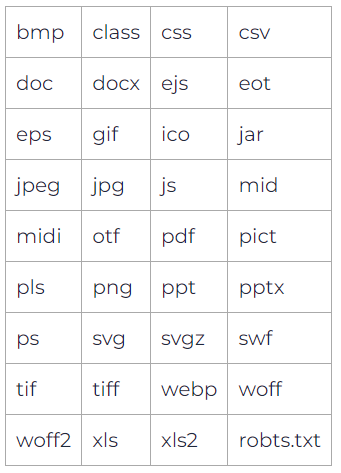
This type of cache is referred to as our Edge Caching as it’s cached at our network edge (a.k.a the CDN nodes). This cache can be purged at any time from the Edge Caching section within your control panel, this is accessed via Manage Hosting > Manage > Edge Caching. Head down to the Purge Cache section to clear all the cached static content from all CDN nodes.
What is Dynamic Cache?
The PaluhostCDN and StackCache can work complementary to each other. The CDN will handle the static cache of static file types, whilst StackCache can handle the dynamic cache.
For websites on the WordPress Platform (i.e. with StackCache), dynamic content is cached with the default expiry times set.
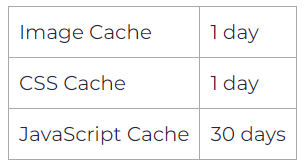
You can edit these values from the Edge Caching section or directly from within StackCache in the WordPress admin area. In addition, you can cache any other dynamic content using public Cache-Control and Expires headers via a .htaccess file – however, this is recommended only for advanced users.
How to check if your website is being cached
The easiest method to check that your site is being cached is to use Google Chrome’s console to view your website’s response HTTP headers. In Google Chrome, follow the steps below:
- Using Chrome, visit your website, right-click and select Inspect to open the Developer Tools.
- Select the Network tab.
- Reload the website and then select any HTTP request from the left panel. The HTTP headers will be displayed in the right panel.

You’ll be looking for the x-cdn-cache-status response to determine if the website has been cached.
Note: If you have other caching plugins such as W3 Total Cache or WP Super Cache these may interfere with the CDN and cause a cache MISS. These plugins can be disabled. For more information please see the guide here: Do I need caching plugins in addition to the PaluhostCDN?